Social Security Calculator1.0.1
Publisher Description


What is the best age to start your Social Security benefits? What if you start at 62 with reduced benefits, but invest and get compound interest? Or is it a good idea for you to wait until 70 for increased benefits?
The Social Security Calculator is a powerful estimating tool that can answer these questions and help you plan for retirement.
[ Features ]
. Estimates the most profitable starting age for your benefits based on your income and life expectancy
. Calculates your potential lifetime net income for all benefit starting ages so you can easily compare the results
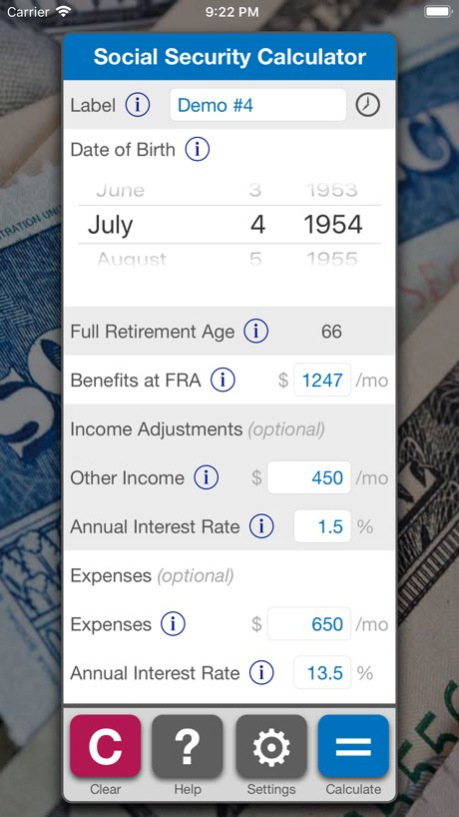
. Your date of birth and benefit amount at full retirement age are all you need to know (benefits at FRA can be found on your Social Security statement or by creating an account on SSA.gov)
. Optionally include other monthly income, an interest rate for income, monthly expenses, and an interest rate for expenses
. Optionally disable paying down expenses (potentially useful in situations when compounding income exceeds compounding expenses)
. Detailed results are presented in interactive Summary, Spreadsheet, and Graph formats
. Calculation inputs can be labeled and saved for quick retrieval and comparison
. Robust in-app help via information buttons, getting started guide, glossary, and links to additional resources
[ Interactive Results ]
. Summary - a table of life expectancy ages with their most profitable starting ages for benefits. Rows can be expanded to show your estimated lifetime net income for every life expectancy age. The lifetime net income rows can be tapped to highlight the corresponding cell in the Spreadsheet.
. Spreadsheet - detailed spreadsheet format showing your estimated lifetime net income for all Social Security starting ages and life expectancy ages. Each lifetime net income cell can be tapped to show more detailed information. The differences in lifetime net income amounts can be easily examined for all benefit starting ages.
. Graph - calculation results displayed as lines depicting estimated lifetime net income for each Social Security starting age. Clearly illustrates the differences in lifetime net income for all benefit starting ages. Any starting age line can be toggled on or off. Tapping a point on the graph will display more detailed information. Supports zooming to show increased granularity.
[ Disclaimer ]
We have carefully followed the benefit rules from the Social Security Administration and have tested to ensure that our calculations are as accurate as possible. However, since we are not affiliated with the SSA, this app is only intended to be used for reference. Before making a retirement decision we strongly recommend reviewing SSA.gov and other resources for more information. (The app links to several useful resources in Help > Additional Resources.)
Also please be aware that this app currently does not calculate spousal benefits or survivor benefits. If you would like us to add this functionality or have any other ideas to improve the app please let us know.
[ Credits ]
. App Design / Development - Denton Kollar
. Original Concept / Consulting - Paul Cichocki
Version History Fixed a few minor UI issues and improved help documentation. 1.0.1 02/05/2019 1.0 01/30/2019
About Social Security Calculator
The company that develops Social Security Calculator is Denton Kollar. The latest version released by its developer is 1.0.1.
To install Social Security Calculator on your iOS device, just click the green Continue To App button above to start the installation process. The app is listed on our website since 2026-10-15 and was downloaded 2 times. We have already checked if the download link is safe, however for your own protection we recommend that you scan the downloaded app with your antivirus. Your antivirus may detect the Social Security Calculator as malware if the download link is broken.
How to install Social Security Calculator on your iOS device:
- Click on the Continue To App button on our website. This will redirect you to the App Store.
- Once the Social Security Calculator is shown in the iTunes listing of your iOS device, you can start its download and installation. Tap on the GET button to the right of the app to start downloading it.
- If you are not logged-in the iOS appstore app, you'll be prompted for your your Apple ID and/or password.
- After Social Security Calculator is downloaded, you'll see an INSTALL button to the right. Tap on it to start the actual installation of the iOS app.
- Once installation is finished you can tap on the OPEN button to start it. Its icon will also be added to your device home screen.
Program Details
System requirements
Download information
Pricing
Version History
version 1.0.1
posted on 2026-10-15
Version History Fixed a few minor UI issues and improved help documentation. 1.0.1 02/05/2019 1.0 01/30/2019
version 1.0.1
posted on 2019-02-05
Fixed a few minor UI issues and improved help documentation.
version 1.0.1
posted on 2019-02-05
Feb 5, 2019
Version 1.0.1
Fixed a few minor UI issues and improved help documentation.
